Video Downloader Pro
- 4.7
- Rating
- 10.00K
- Installs
- $9.99
- Price

 Analysis by App-foxy
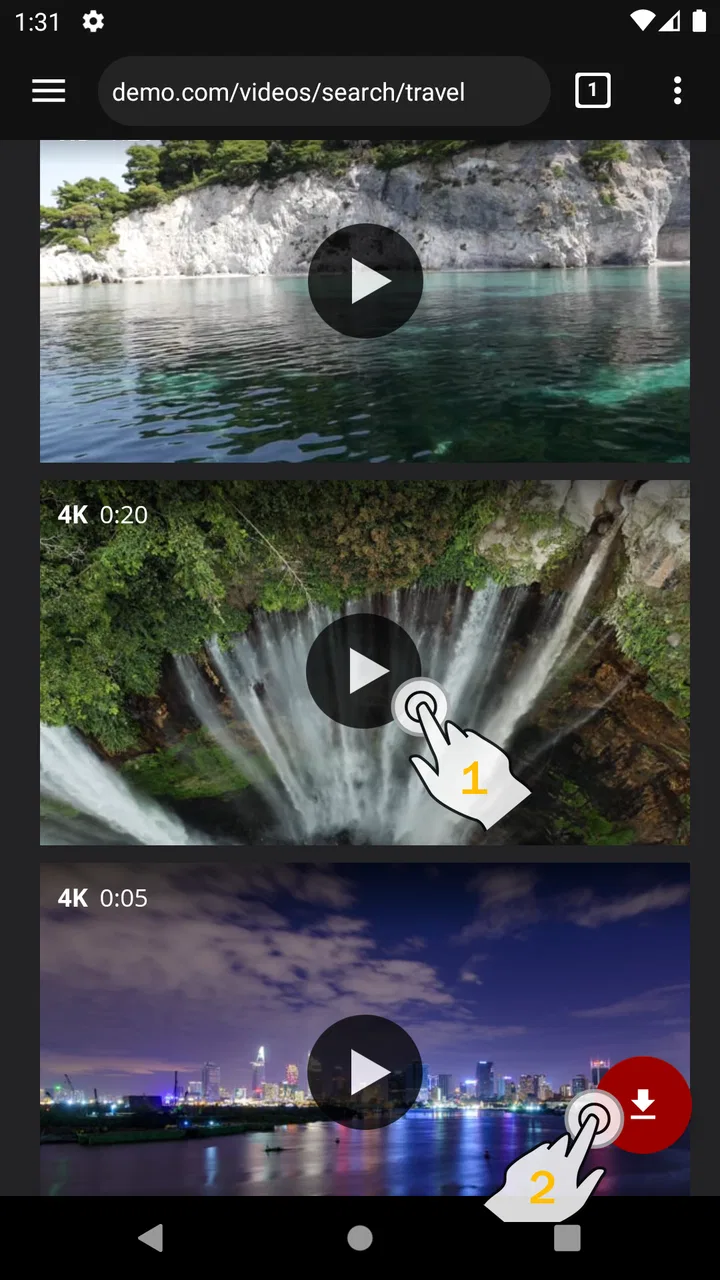
I approached Video Downloader Pro as the kind of tool you open when streaming is inconvenient rather than as a full video-editing suite. Developed by MobiDevApps, this Android app sits in the video players and editors category and focuses on saving videos for offline playback. That sounds simple, but the real experience depends heavily on the source of the video, the way the download is started, and how much storage and patience you have available.
My overall impression is positive when the task is straightforward: find a compatible video, save it, and watch it later without relying on a connection. The app has a 4.7 average from around 974 ratings, which matches my sense that its basic purpose is easy to understand. At the same time, a downloader is never completely independent of the websites and services it interacts with. When something fails, the app is not always the cause.
Why the first download can be more confusing than expected
The most common point of friction is the difference between a video that plays in a browser and a video that can be saved by a separate downloader. Playback only proves that a service can deliver the content to its own player. It does not automatically mean that another app can identify, access, or store the same stream. This distinction is important because it prevents a lot of unnecessary troubleshooting.
You May Also Like

 Pandora - Music & Podcasts
Pandora’s Music Is Easy to Start, but Harder to Recover
Pandora’s strength is its low-effort path from a seed to a station. Its weak spot is how much confidence it asks you to place in connection, setup, and quiet recovery.

 8 Ball Pool
 Is Built on Rivalries, Rematches, and Routine
A close look at the rivalries, rematches, shared routines, and unanswered safety questions that turn a quick pool match into a persistent mobile community.

 Samsung Music
’s Quiet Strength Is Playing What You Already Own
Its reach comes less from spectacle than from dependable access to a personal library. That simplicity is both the app’s strongest retention engine and its ceiling.

 AccuWeather: Weather Radar
AccuWeather Review: A Quick, Clear Forecast for Everyday Decisions
For everyday plans, the best forecast is the one you can understand quickly. AccuWeather makes rain timing, radar, and local conditions easy to act on, with a few trade-offs.

 Hill Climb Racing
Why Hill Climb Racing Still Turns Crashes Into One More Run
A tiny car, a bumpy hill and one more upgrade: Hill Climb Racing keeps resurfacing because its simple chaos makes every near-miss feel personal.

 AliExpress - Shopping App
AliExpress Makes Global Shopping Feel Personal, but Shoppers Bear the Risk
AliExpress turns a global marketplace into a pocket-sized discovery engine. Its reach is useful, its shopping loop compelling, and its trade-offs easy to miss.
More From Our News Desk
View All News


I would begin with a video that is clearly available for personal offline use and that does not require a private account, a special subscription, or an embedded player with unusual restrictions. If the first attempt is made on a complicated page, it becomes difficult to tell whether the problem comes from the page, the network, or the app. Starting with a simple, openly accessible source is a much better diagnostic step.
The app is also a paid download at $9.99, so I would not treat it as a casual experiment for someone who only wants to save one short clip. Its value makes more sense for a person who regularly travels, works in places with unreliable connectivity, or wants a repeatable offline viewing routine. Before paying, I would think about how often I genuinely need saved videos and whether the services I use already offer their own offline option.
Another point worth understanding is the difference between downloading and editing. Although the app belongs to a category that includes video editors, its stated purpose is downloading and offline playback. I would not choose it expecting a timeline, filters, captions, trimming tools, or a production workflow. That expectation mismatch is one of the easiest ways to judge the app unfairly.
Setup checks that save time before troubleshooting
The application was released on November 2, 2021, and its current version is 1.8.9. It requires Android 7.0 or later, so the first practical check is the device itself. On a compatible phone, I would still make sure the operating system is behaving normally, the app is installed from a trustworthy source, and there is enough free storage for the intended videos.
Storage deserves more attention than most people give it. A few saved videos can quietly consume space, especially when the original files are large. I recommend checking available storage before starting a long download and deciding in advance where finished files should be kept. If the phone is nearly full, an apparently failed download may simply be a storage problem rather than an application defect.
I would also test the network before blaming the downloader. A page that loads slowly, switches between Wi-Fi and mobile data, or pauses during normal playback is a poor candidate for a first download. A stable connection makes it easier to distinguish a source-compatibility issue from a temporary connection problem. If possible, I would use one consistent network from start to finish instead of changing connections halfway through.
One useful habit is to keep the first test short. I would select a modest video, wait for it to finish, and then open the saved file before attempting a larger collection. This confirms three separate things: that the source can be handled, that the file is being stored successfully, and that offline playback works on the device. Testing all three at once is more informative than repeatedly tapping download on a long video.
It is also worth checking the source page carefully. Some pages contain several video elements, advertisements, previews, or automatically playing clips. If the app presents more than one possible item, I would compare the choices with the actual video I intend to save instead of selecting the first result automatically. A wrong selection can look like a download failure when the app has simply captured a different piece of media.
A calmer workflow when a download stalls or disappears
When a download does not behave as expected, I would avoid restarting the same action repeatedly. First, I would note whether the failure happens before any progress begins, during the transfer, or after the file appears to finish. Each stage points to a different kind of problem. A failure at the beginning often suggests that the source was not recognized, while an interruption later may be related to connectivity or storage.
If nothing starts, I would return to the source and try a simpler, publicly accessible video rather than changing several settings at once. This is a practical isolation test. If the simpler source works, the original page is the more likely obstacle. If neither works, I would then look at the device, connection, and available space.
If progress stops partway through, I would check whether the network changed, whether the phone entered a restrictive battery state, and whether another large task is consuming the connection. I would then retry only after the conditions are stable. Repeatedly starting and cancelling the same transfer can leave behind incomplete files or make it harder to identify which attempt actually succeeded.
After a completed download, I would verify the result immediately. Open the file while still connected, then briefly test it again with the connection disabled or otherwise unavailable. This simple check confirms that the video is genuinely stored locally rather than merely being available through a temporary page or cached session. It also reveals whether the file opens in the expected player on the phone.
If a saved video cannot be found, I would search the device’s video or file locations rather than assuming it vanished. I would look for a recently modified file and compare its size with the expected length of the video. A very small file may indicate an incomplete transfer, while a normal-looking file that will not open could point to a playback compatibility issue. The important thing is to inspect the result before downloading the same item again.
For a larger offline library, I would use a naming routine from the beginning. Even a simple pattern based on subject and date makes saved files much easier to identify later. This is one of the less obvious trade-offs of downloader apps: the initial save is convenient, but organization becomes the user’s responsibility once several videos accumulate.
When the app is not the real cause
Some failures are controlled by the service hosting the video. A website may change its page structure, require a login, restrict access by region, or deliver content through a player that outside tools cannot handle. In those cases, reinstalling the app or clearing everything on the phone is unlikely to solve the underlying issue. I would first test a different legitimate source before concluding that the application is broken.
Account and access restrictions are another boundary. If a video is visible only after signing in, or if the service provides its own protected offline feature, I would use the official method instead. That route is usually more reliable for private or subscription-based material and is less likely to break when the service changes its delivery system. Video Downloader Pro is most convincing as a general offline tool, not as a way around access controls.
File playback can also be the separate problem. A successful save does not guarantee that every device or player will handle every video format in exactly the same way. If a file exists but will not play, I would test it with another suitable local player and compare it with a different saved video. That comparison helps separate an issue with the file from an issue with the phone’s default playback software.
Battery and background behavior can complicate long transfers as well. Phones may limit background activity to preserve power, especially when the screen is off or the device is in a low-power state. For an important download, I would keep the phone sufficiently charged, avoid aggressive power-saving conditions, and leave the app in a stable state until the transfer finishes. These are general device checks, but they matter more for downloading than for ordinary browsing.
Privacy and legality should shape the workflow too. I would save only videos I have permission to store and use them for appropriate personal purposes. The safest approach is to respect the source’s terms and choose content intended for downloading or offline use. This is not merely a legal footnote; it also improves reliability because openly available material is less likely to depend on fragile authentication or protected delivery methods.
Where it fits beside the usual alternatives
The most obvious alternative is an official offline feature built into a streaming or video service. That option is generally preferable when it is available because the service controls the account, the playback method, and the content access. Video Downloader Pro becomes more appealing when I want a separate local copy for ordinary offline playback, or when I am working with compatible sources that do not offer a convenient built-in download button.
A browser alone is better for quick viewing and requires no separate library-management habit. It is also the simpler choice if I rarely need offline access. The trade-off is that browser playback depends on the connection and can be interrupted by page changes, network drops, or service behavior. The app earns its place when offline access is a recurring need rather than an occasional emergency.
Dedicated file-management tools may provide more control over folders and naming, while editing apps are the right choice for cutting, combining, or enhancing footage. I would not combine those expectations with this product. Its strength is a narrower workflow: obtain a compatible video and play it later. That focus is useful, but it means users who want a complete media toolbox will probably need something else as well.
The paid price is the biggest decision point. Someone who downloads frequently may find the convenience worthwhile, particularly if repeated offline access saves mobile data or avoids unreliable connections. Someone who only watches a few videos each month should compare that cost with official offline plans, ordinary browser use, or simply choosing content that is already available locally. The app is not automatically better because it is more specialized.
Who will get the most from it
I see the best fit in a commuter who regularly loses signal, a traveler preparing a small collection before a journey, or a student saving permitted instructional material for a place with weak connectivity. In a realistic evening routine, I would choose a few suitable videos while connected to home Wi-Fi, download and test them one by one, rename or organize them, and then rely on the local copies the next day. The useful part is not just saving the files; it is removing uncertainty before leaving the reliable network.
It can also help someone who wants to avoid repeatedly streaming the same material. Watching a stored file can reduce dependence on changing connection quality and makes playback more predictable. The benefit is strongest when the videos are revisited, because a one-time download has less value than a small offline collection used over several days.
I would recommend skipping it if your viewing is almost entirely inside services with excellent official offline support. I would also skip it if you expect advanced editing, automatic organization, cloud synchronization, or guaranteed compatibility with every video page. Those needs point toward a different kind of app. The narrower the task, the easier it is to decide whether the $9.99 purchase makes sense.
My practical verdict after weighing the friction
Video Downloader Pro is a focused Android app with a clear offline purpose, and I like it most when I treat it as part of a careful workflow rather than a magic button. The key habits are simple: start with a compatible public source, test a short video, watch storage and connectivity, verify the saved file, and organize downloads before they pile up.
Its 10K-plus installs suggest a modest user base, while the Everyone age rating makes it broadly approachable. The app’s current version, 1.8.9, and Android 7.0 requirement also make device compatibility an easy first check. Those details do not remove the limitations caused by websites, protected content, or phone-level storage and battery behavior, but they help set realistic expectations.
My recommendation is therefore conditional but favorable. If offline video saving is something you will use regularly and your sources are compatible, the focused design can be genuinely useful. If you need only occasional playback, prefer official service downloads, or want a full editor, I would choose another route. For the right user, though, the app’s strongest feature is straightforward: it turns a carefully tested download into a video I can watch when the internet is no longer dependable.
FAQs for Video Downloader Pro
01What is Video Downloader Pro and what can it do?
Video Downloader Pro is designed to help users save online videos for later viewing on a mobile device. Depending on the service and the video source, it may support downloading clips in different resolutions, managing saved files, and playing content offline. Its exact capabilities can vary between Android and iOS versions, so users should review the app’s current store description before downloading.
02Can Video Downloader Pro download videos from any website or social media platform?
No, users should not assume that every website or platform is supported. Many services restrict downloading through their terms of use, technical protections, or copyright policies. Video Downloader Pro generally works only with compatible sources and publicly accessible content. Before saving a video, check whether downloading is permitted and avoid attempting to bypass security, subscription, or digital-rights restrictions.
03Is Video Downloader Pro free to use, or does it include paid features?
The application may be available as a free download while offering optional purchases, subscriptions, advertising removal, or premium tools. These can include higher-quality downloads, an ad-free experience, faster processing, or additional file-management options. Pricing and available features may change, so users should carefully check the official Google Play or App Store listing before confirming any purchase.
04Where are downloaded videos stored, and can they be shared or moved?
Downloaded files are usually kept inside the app’s private library or a designated media folder, depending on the operating system and the permissions granted. Android users may have more control over file locations, while iOS can limit access through its file-management system. Sharing, exporting, or moving videos may also depend on the file format and the original content’s restrictions.
05Is Video Downloader Pro safe and legal to use?
Safety depends largely on downloading the app from an official store, keeping it updated, and reviewing the permissions it requests. Users should be cautious of unofficial versions that may contain malware or intrusive advertising. Legality depends on the source, copyright status, and platform rules for each video. Download only content you own, have permission to save, or that is explicitly offered for offline use.
Pros
- Supports downloading videos for offline viewing.
- Simple interface makes downloads easy to start.
- Offers multiple video quality options.
- Can help save mobile data during repeated playback.
- Useful for keeping favorite clips available without internet.
Cons
- Downloading may be restricted on some websites.
- Downloaded files can use substantial storage space.
- Some features may require in-app purchases.
- Ads may interrupt the free version experience.
- Download speeds depend heavily on your connection.

Video Downloader Pro
Gallery